Nginx for windows(网页Web服务器)
v1.21.2 官方最新版大小:1.64 MB更新:2021/09/03
类别:服务器区系统:Winll
分类分类
大小:1.64 MB更新:2021/09/03
类别:服务器区系统:Winll
nginx for windows是一款轻量级的Web 服务器,现在很多反向代理服务器及电子邮件(IMAP/POP3)代理服务器,不仅可以减小服务器压力,同时也提高安全度。
Nginx是Apache服务器不错的替代品:Nginx在美国是做虚拟主机生意的老板们经常选择的软件平台之一。能够支持高达 50,000 个并发连接数的响应。笔者将会使用Nginx将默认网址使用的80端口与tomcat使用的8080端口进行对接,实现使用80端口(域名)访问Tomcat下的网页,并配置HTTPS协议提高安全性。
1、安装的说明
下载后解压得到如下一些文件
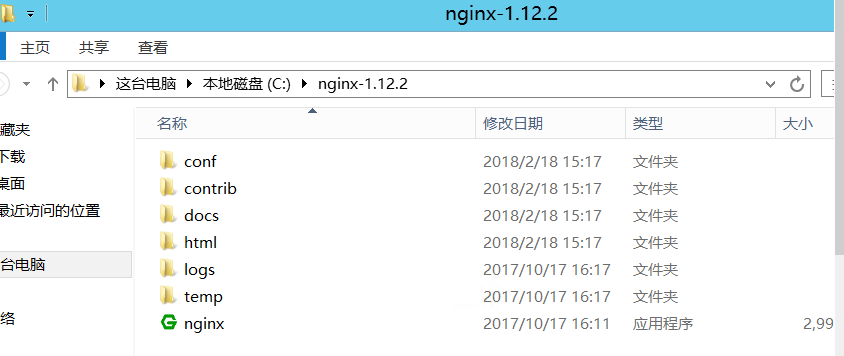
首先需要域名和SSL证书来配置HTTPS协议,SSL证书可以从很多地方获取或者自己创建
这里以腾讯云的CA证书为例子,有了域名和SSL证书后,按照腾讯云的官方提示,将配置Nginx的安全证书(.crt)和注册表项(.key)放到Nginx解压目录下的conf文件夹下方便管理【证书的名字这里改为1.crt和2.key】
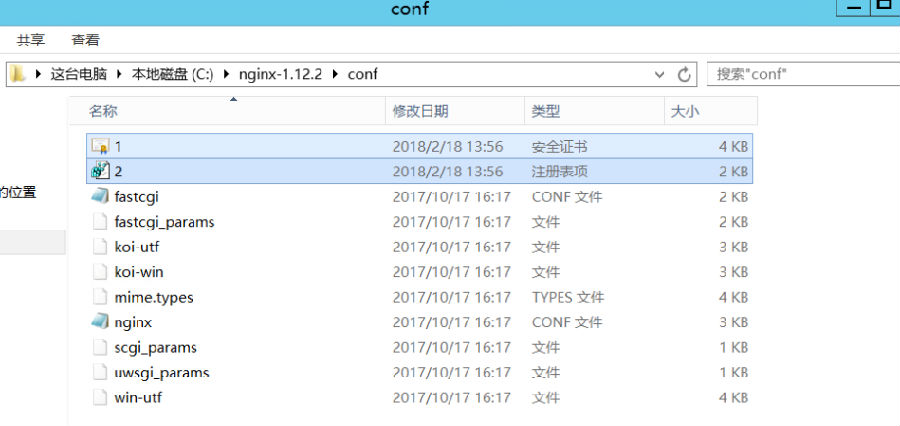
然后需要将其配置到Nginx中,修改conf目录下的nginx.conf文件如下:
#user nobody;
#user root;
worker_processes 1;
#error_log logs/error.log;
#error_log logs/error.log notice;
#error_log logs/error.log info;
#pid logs/nginx.pid;
events {
worker_connections 1024;
}
http {
include mime.types;
default_type application/octet-stream;
#log_format main '$remote_addr - $remote_user [$time_local] &$request& '
# '$status $body_bytes_sent &$http_referer& '
# '&$http_user_agent& &$http_x_forwarded_for&';
#access_log logs/access.log main;
sendfile on;
#tcp_nopush on;
charset utf-8;
#keepalive_timeout 0;
keepalive_timeout 120;
#gzip on;
#填写自己的服务器ip和Tomcat端口
upstream local_tomcat {
server xxx.xxx.xxx.xxx:8080;
}
server {
listen 80 default_server;
listen 443 ssl;
charset utf-8;
#填写自己的网站域名
server_name www.xxxx.xxx;
#证书文件
ssl_certificate C:/nginx-1.12.2/conf/1.crt;
#私钥文件
ssl_certificate_key C:/nginx-1.12.2/conf/2.key;
ssl_session_timeout 5m;
ssl_protocols TLSv1 TLSv1.1 TLSv1.2;
ssl_ciphers ECDHE-RSA-AES128-GCM-SHA256:HIGH:!aNULL:!MD5:!RC4:!DHE;
ssl_prefer_server_ciphers on;
#配置HTTPS
location ~ /^[H,h][T,t][T,t][P,p][S,s]/ {
#网站根目录,为Tomcat下的wepapps目录
root C:/Tomcat7/apache-tomcat-7.0.82/webapps;
proxy_pass http://127.0.0.1:8080;
proxy_set_header Host $http_addr;
proxy_set_header X-Real-IP $remote_addr;
proxy_set_header X-Forwarded-For $proxy_add_x_forwarded_for;
}
location ~ .jsp$ {
root C:/Tomcat7/apache-tomcat-7.0.82/webapps;
proxy_pass http://local_tomcat;
proxy_set_header Host $host:$server_port;
proxy_set_header X-Real-IP $remote_addr;
proxy_set_header X-Real-PORT $remote_port;
proxy_set_header X-Forwarded-For $proxy_add_x_forwarded_for;
}
location ~ .html$ {
root C:/Tomcat7/apache-tomcat-7.0.82/webapps;
proxy_pass http://127.0.0.1:8080;
proxy_set_header Host $http_addr;
proxy_set_header X-Real-IP $remote_addr;
proxy_set_header X-Forwarded-For $proxy_add_x_forwarded_for;
}
location / {
root C:/Tomcat7/apache-tomcat-7.0.82/webapps;
proxy_pass http://127.0.0.1:8080;
proxy_set_header Host $http_addr;
proxy_set_header X-Real-IP $remote_addr;
proxy_set_header X-Forwarded-For $proxy_add_x_forwarded_for;
}
#error_page 404 /404.html;
# redirect server error pages to the static page /50x.html
#
error_page 500 502 503 504 /50x.html;
location = /50x.html {
root html;
}
# proxy the php scripts to Apache listening on 127.0.0.1:80
#
#location ~ .php$ {
# proxy_pass http://127.0.0.1;
#}
# pass the PHP scripts to FastCGI server listening on 127.0.0.1:9000
#
#location ~ .php$ {
# root html;
# fastcgi_pass 127.0.0.1:9000;
# fastcgi_index index.php;
# fastcgi_param SCRIPT_FILENAME /scripts$fastcgi_script_name;
# include fastcgi_params;
#}
# deny access to .htaccess files, if Apache's document root
# concurs with nginx's one
#
#location ~ /.ht {
# deny all;
#}
}
# another virtual host using mix of IP-, name-, and port-based configuration
#
#server {
# listen 8000;
# listen somename:8080;
# server_name somename alias another.alias;
# location / {
# root html;
# index index.html index.htm;
# }
#}
# HTTPS server
#
#server {
# listen 443 ssl;
# server_name localhost;
# ssl_certificate cert.pem;
# ssl_certificate_key cert.key;
# ssl_session_cache shared:SSL:1m;
# ssl_session_timeout 5m;
# ssl_ciphers HIGH:!aNULL:!MD5;
# ssl_prefer_server_ciphers on;
# location / {
# root html;
# index index.html index.htm;
# }
#}
}
2、 运行Nginx:
打开命令提示符跳转到nginx解压目录输入nginx

出现上述提示说明启动nginx失败,是由于电脑的80端口已经被占用,占用80端口的原因和解除方式都有很多种,例如SQLServer的ReportingServicesService占用,Apache,iis,或者其他原因,笔者在这就不说明怎么解除占用了
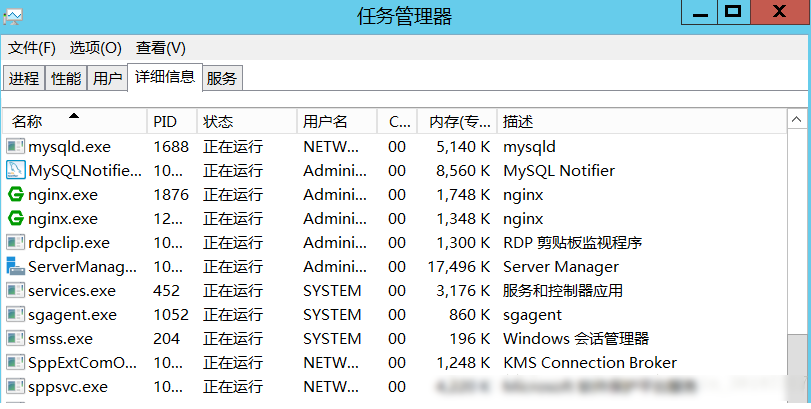
解除占用后正常启动如下图:可以在任务管理器看到有两个nginx程序在运行,至于为什么是两个,可以查看Nginx官方的文档,不解释了
3、关于使用
开启Nginx,Tomcat。打开浏览器输入http(s)://你的域名/项目文件名/文件名即可进行访问
例如笔者配置的服务器(如果我的服务器开着的话可以访问。。。):
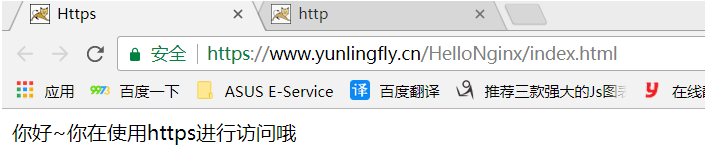
1 首次安装Nginx时,不要直接点击nginx.exe程序,否则会导致很多问题,当配置完成后,以后再开启nginx即可直接点击nginx.exe程序,不需要再使用命令提示符操作,附nginx的基本操作指令:
开启:start nginx
检查配置文件:nginx -t -c C:/nginx-1.12.2/conf/nginx.conf
重新加载配置文件(很实用的指令):nginx -s reload
快速停止:nginx -s stop
完整停止:nginx -s quit
2 检测配置文件没有问题,但是使用HTTPS不能访问,可能是由于防火墙的原因,可以将其关闭试试,成功后,可以自己配置防火墙入网规则,将80(Nginx),443(SSL),1433(sql server),8080(Tomcat)等等端口添加至防火墙里,来继续开启防火墙(我当时就是在这麻烦了很久)
3 有些nginx.conf配置不正确会导致访问网页时样式文件(js、css)不能一起返回,经过测试,笔者的配置是没有这个问题的
ps:感谢作者:芸灵fly分享的教程
v1.19.9版本更新
修复 nginx 在使用邮件代理模块 (mail proxy module) 时无法构建的问题,使用 ngx_mail_ssl_module 则正常。这个错误出现在 1.19.8 中
修复当与 gRPC 后端搭配使用时,可能出现&upstream sent response body larger than indicated content length&错误。这个问题出现在 1.19.1 中
如果客户端在丢弃请求体的同时关闭了连接,nginx 可能在 keepalive 超时前不会关闭连接
当等待 auth_delay 或 limit_req 延迟时,或者与后端一起搭配使用时,nginx 可能无法检测到客户端已经关闭的连接
修复 eventport 方法中的错误
v1.2.8版本更新
新的会话没有如果“ssl_session_cache共享”指令用于存储和共享内存中有没有免费的空间。感谢彼得·西科拉。
如果子请求使用一个DNS子请求处理过程中发生了错误的反应可能会挂起。感谢到Lanshun周。
在的ngx_http_mp4_module。由于赫尔诺特Vormayr。 *)修正:在后端使用的计数。
v1.2.12版本更新
变量支持在“proxy_bind”,“fastcgi_bind”,“memcached_bind”,“scgi_bind”,和“uwsgi_bind”指令。
管,request_length,$ time_iso8601,美元和$time_local变量,现在不仅可以在“log_format”使用指令。
支持IPv6ngx_http_geoip_module。
修正指令“proxy_method”。
修正一个分割故障可能发生在工作进程中,如果使用的投票方法解析。
修正nginx的可能霸占CPU在SSL握手与后端的选择,投票,或使用/ dev / poll的方法。
修正“暴击SSL_write()失败(SSL:)”的错误。
修正“client_body_in_file_only”指令的错误。
修正指令“fastcgi_keep_conn”。
v1.2.2版本更新
修复了使用 try_files 时可能导致的段错误的问题,该问题出现在 1.1.19 版本
当缓冲超过 IOV_MAX 时可能会导致响应被截断
修复了 image_filter 指令使用 crop 参数的问题
Nginx稳定版v1.23.0 官方版时间:2022-06-23下载
Nginx服务器套装(wnmp开发环境套件)v2.2.4 官方版时间:2019-05-27下载
nginx for Linuxv1.11.8 英文官方安装版时间:2018-03-15下载
nginx for windowsv1.11.8 英文官方安装版时间:2018-03-15下载
ccproxy免注册码服务器区6.27 MBv8.0 破解版
详情proxycap汉化版服务器区2.93 MBv5.00 永久使用版
详情serv-u 简体中文破解版服务器区19.00 MBv15.1.6.25 绿色特别版
详情Tiny PXE Server服务器区5.54 MBv1.0.0.23 绿色版
详情xp sp3 i386安装包服务器区13.20 MB
详情msysgit中文版服务器区37.60 MBv2.6.3 官方最新版
详情北京时间服务器区234.50 MBv11.4.0
详情ASP - IIS服务器服务器区628.00 KB绿色版
详情Apache Tomcat9.0 64位服务器区10.43 MBv9.0.0.9 官方免安装版
详情阿拉丁UDP洪水攻击器服务器区977.00 KBv2.1 绿色版
详情NAS4Free 64位(NAS服务器搭建软件)服务器区224.25 MBv10.2.0
详情Serv U FTP Server 10(FTP 服务器)服务器区6.30 MBv10.3多国语言绿色特别版
详情遥志代理服务器服务器区2.86 MBv8.0.0.0 官方版_ccproxy中文版
详情u-mail邮件服务器软件免费版服务器区53.89 MBv9.8.66 最新版
详情易邮邮件服务器eyoumailserver免费版服务器区1.03 MBv5.3 最新版
详情网克工具GhostCast Server服务器区265.00 KBv8.3 绿色中文版
详情守望简单web服务器服务器区627.00 KB绿色免费版
详情xampps X64服务器区163.00 MBv8.1.2 最新版
详情iis6.0完整安装包服务器区7.66 MB适用于XP2003Internet信息服务
详情win10 iis管理器服务器区15.10 MBv7.0 完整安装包
详情点击查看更多
Microsoft Exchange Server 2003服务器区128.85 MB简体中文企业版
详情Microsoft Exchange Server 2010 SP2服务器区526.00 MB64位微软官方安装版
详情PHP 5.3.1 VC6 Thread Safe Zip服务器区13.14 MB
详情IIS7.0完整安装包服务器区174.00 MB安装版
详情SQL Server 2005服务器区36.00 MB精简绿色版(36M)
详情XAMPP for Windows服务器区147.00 MBv8.0.5.0 多国语言官方安装版
详情umail邮件系统服务器区59.29 MBv9.8.58 官方版
详情ccproxy免注册码服务器区6.27 MBv8.0 破解版
详情Cisco GNS3模拟实验常用的思科IOS集合包服务器区221.00 MBv2017 最新版
详情PHP v5.2.9.2 For Windows服务器区17.51 MB官方安装版
详情apache Tomcat for windows服务器区7.18 MBv5.5.20 中文版
详情PHP For Windows服务器区18.64 MBv5.6 官方版
详情Kiwi Syslog Server日志服务器服务器区59.84 MBv9.5.1 安装版
详情IIS5.1完整安装包服务器区11.82 MB
详情tomcat6.0绿色版服务器区7.68 MBv6.0.45 x64版
详情xampp(PHP5.3+5.6+7.0)服务器区31.50 MBv2016 官方绿色版
详情phpStudy 2018服务器区59.81 MBv1.17 最新版
详情bitvise ssh server(最好用的winsshd)服务器区19.00 MBv8.3.7 官网最新版
详情Microsoft SQLServer 2005 Management Studio Express SP3服务器区41.90 MB32位/64位 官方简体中文版
详情phpstudy 2016(PHP环境一键安装包)服务器区52.00 MB支持php7
详情点击查看更多
PHPOpt for IIS系统服务器区5.70 MBv4.0 简体中文版
详情xmanager enterprise 5注册机服务器区10.00 KB附注册码及使用教程
详情zend framework 1.10.2 核心版服务器区5.72 MB官方版
详情Apache Tomcat 7.0服务器区8.54 MBv7.0.70 官方安装版
详情迷你ASP服务器(Sws AspWebServer)服务器区1.33 MBv2.3 官方版
详情360主机卫士iis版服务器区20.60 MBv1.0.9.47 官方版
详情XAMPP for Windows服务器区147.00 MBv8.0.5.0 多国语言官方安装版
详情服务器安全狗服务器区26.01 MBv5.0.24188 官方版
详情花生壳动态域名解析服务器区2.35 MBv5.3.0.34889 官方正式版
详情IIS7.0完整安装包服务器区174.00 MB安装版
详情Apache Tomcat8.0 64位服务器区10.38 MBv8.5.4 官方免安装版
详情xampps X64服务器区163.00 MBv8.1.2 最新版
详情iis6.0完整安装包服务器区7.66 MB适用于XP2003Internet信息服务
详情apache Tomcat for windows服务器区7.18 MBv5.5.20 中文版
详情IIS5.1完整安装包服务器区11.82 MB
详情IIS 6.0(windows2003 安装iis i386 所需要文件)完整安装包服务器区15.30 MB2012-4-21号修复
详情啊D组件查询程序服务器区213.00 KBv1.0 绿色版
详情Microsoft Exchange Server 2003服务器区128.85 MB简体中文企业版
详情Nginx服务器套装(wnmp开发环境套件)服务器区38.51 MBv2.2.4 官方版
详情小旋风asp webserver软件服务器区1.00 MB官方安装版
详情点击查看更多