adobe lightroom6注册机
32位/64位 免费版大小:85.00 KB更新:2016/09/13
类别:图像处理系统:Winll
分类分类
大小:85.00 KB更新:2016/09/13
类别:图像处理系统:Winll
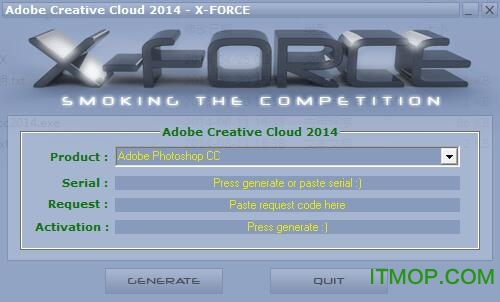
lightroom6注册机是adobe photoshop Lightroom CC 2015软件的注册及破解工具,lightroom 6.0是Adobe最新的一款专业图像处理软件,全新的功能包括HDR图片制作、视频幻灯片展示、面部识别等功能,能够快速导入、灵活处理并打印照片,使用该注册机可以快速破解软件使用权限,激活软件功能,有需要的用户欢迎来IT猫扑下载~
1.断开互联网。
在 C:windowssystem32driversetchosts 中删除hosts中屏蔽的如下网址:
127.0.0.1 lmlicenses.wip4.adobe.com
127.0.0.1 lm.licenses.adobe.com
2.打开 xf-adobecc.exe 注册机,生成序列号(请勿关闭注册机),
安装 ADOBE CC 软件:
点击“安装”(我已经购买),
点击登录 ADOBE ID,(请确保已经断网),
选择稍后连接,
接受许可协议,输入刚注册的序列号,
点击下一步,出现错误提示“请连接到互联网,然后重试”后,点击稍后连接。
3.启动安装好的 adobe 应用程序。(如 AE PS PR等)
4.点击“接到互联网时遇到麻烦吗?”
点击离线激活
5.复制界面中生成的requets代码,然后复制到注册机的requets选项中,
点击注册机generate按钮,在Activation选项中出现新的代码,
复制这段代码到Adobe软件中,然后点击激活。
6.点击启动或者关闭按钮。退出ADOBE 应用程序。
7.完成安装后,请双击 disable_activation.cmd (以管理员身份运行)。
或者手动添加如下网址到 C:windowssystem32driversetchosts文件中:
127.0.0.1 lmlicenses.wip4.adobe.com
127.0.0.1 lm.licenses.adobe.com
127.0.0.1 na1r.services.adobe.com
127.0.0.1 hlrcv.stage.adobe.com
127.0.0.1 practivate.adobe.com
127.0.0.1 activate.adobe.com
8.完成注册,享受。(能在线升级)
注意:如果在安装/破解遇到任何问题,请删除这些文件夹后重新安装:
C:Program Files (x86)Common FilesAdobeSLCache
C:ProgramDataAdobeSLStore
1160-4443-1009-6768-3227-9416
1160-4903-6679-7869-8158-3458
1160-4048-7192-7859-0182-7092
1160-4540-5427-1256-6156-5887
1160-4574-1162-8484-6639-6832
1160-4416-5580-8572-8618-2655
1160-4539-1638-1168-8548-0562
1,Adobe Photoshop Lightroom6.0 不再支持 Windows XP 系统,仅能运行在 Windows Vista、Windows 7 及以上系统!
2,首先你安装Adobe Photoshop Lightroom 6简体中文版(其实是多语言版本);
3,以记事本格式打开C:WINDOWSsystem32driversetc下的hosts文件,添加下列文字,最后保存:127.0.0.1 activate.adobe.com。如果无法直接修改,小编建议你先将hosts文件复制到桌面或者其他地方再用记事本打开修改,保存后再覆盖原文件。
4,安装时或者安装结束后启动Adobe Photoshop Lightroom 6使用上面序列号中一枚;
5,再次运行Adobe Photoshop Lightroom 6,你会发现不再提示激活提醒,证明Adobe Photoshop Lightroom 6破解成功。
Stunning panoramas - 全景效果
Capture superwide fields of view and amazing detail. Photomerge technology lets you stitch together multiple images, including raw files, to create seamless panoramas.See how it works ?
HDR images made easy HDR图片制作
Create natural-looking or surreal images from extremely high-contrast scenes. Using HDR Merge, you can easily combine multiple shots taken with different exposure settings into a single high dynamic range image. See how it works ?
Faster performance – 更快的性能
Import and perfect your photos faster than ever. Lightroom takes advantage of compatible graphics processors to boost its overall speed, especially when you’re enhancing images in the Develop module.
Improved web galleries - 改进的Web画廊
Showcase your work in more elegant, engaging and interactive web galleries. New HTML5-compatible gallery templates work with the widest range of desktop and mobile browsers.See how it works ?
Facial recognition – 面部识别
Quickly find images of family and friends, even without metadata tags. Select a face in one photo, and Lightroom searches for that person in all your other images. Categorize and group your photos based on faces. See how it works ?
Advanced video slide shows – 视频幻灯片展示
Create beautiful, polished slide shows using still images, video and music along with professional effects like pan and zoom. See how it works ?
Better control of filters – 滤波器更好的控制
Precisely control which parts of your image are affected by the Graduated or Radial filters. Now you can use a brush to edit the filter’s mask, adding or subtracting filter effects wherever you want.See how it works ?
Copy-paste enhancements - 复制粘贴功能
On your iPad or iPhone, you can quickly copy adjustments from one photo and paste them onto another for ultra-fast processing.
Easy photo sharing – 轻松分享照片
Publish web galleries with Lightroom. Get feedback on your photos, start discussions and more — all from Lightroom on your mobile device or desktop.See how it works ?
Support for more devices – 更多设备的支持
Lightroom is now on Android devices. And just like on iPad and iPhone, all your edits sync back to your computer.Learn more ?
Visual storytelling – 视觉故事
Pull images from Lightroom into Adobe Voice and Slate on your iPad or iPhone to craft visual stories and animated videos.
Perfect presentations – 完美的表现
Use the new Presentation mode on your iPad or iPhone to show off photos without accidentally adjusting or editing them.
Fast photo searching – 照片快速搜索
The Segmented view on your iPad or iPhone helps you find favorite photos faster than ever.
Quick composition adjustment – 快速调整
A redesigned cropping experience on iPad and iPhone lets you quickly adjust, align and auto-straighten your photos.
Adobe Photoshop Lightroom 手机版免登录版v8.0.1时间:2022-12-09下载
lightroom移动版中文版v8.0.1时间:2022-12-02下载
Adobe Photoshop Lightroomv2.6 完美者特别版时间:2021-08-08下载
Lightroomv5.4 简体中文破解版时间:2020-12-16下载
Adobe Photoshop Lightroom(32位/64位)V4.4 多国语言官方安装版时间:2020-04-07下载
Adobe Photoshop Lightroom(支持xp)v3.2.0 简体中文绿色特别版时间:2018-05-23下载
Adobe Lightroomv3.6 简体中文破解版时间:2017-02-10下载
adobe photoshop lightroom cc 2017免费版v6.8 中文多语版_附破解补丁/注册机时间:2017-01-05下载
Adobe Photoshop Lightroom(数字图像处理)v5.5 绿色精简特别版时间:2017-01-05下载
南方cass11.0完美免狗版图像处理546.00 MBv11.0.0.8 免费版
详情美图秀秀经典版图像处理38.07 MBv4.0.1.简体中文版
详情Adobe Illustrator CS6图像处理217.11 MB32位/64位 绿色精简优化版
详情coreldraw x7 64位绿色破解版图像处理467.00 MB简体中文版
详情photoshop cc2017图像处理249.84 MBv18.0 中文绿色版
详情amtemu 0.9.2中文版(adobe通用破解补丁)图像处理1.80 MBv0.9.2 免费版_for win
详情Adobe Photoshop 2021中文版图像处理850.50 MBv22.0.0 绿色精简版
详情Adobe Photoshop CC 2019绿色版图像处理294.45 MBv20.0 中文免安装版
详情Adobe Photoshop CS8.0.1图像处理150.37 MB简体中文绿色版
详情南方cass8.0完美破解版(附安装教程)图像处理36.48 MB64位/32位
详情南方cass9.2安装图像处理78.00 MB64位单机版
详情Adobe Illustrator CS6 64位图像处理251.00 MB绿色简体中文版
详情coreldraw(矢量绘图软件)图像处理283.23 MBv9.0 简体中文完整版
详情Adobe Photoshop CS5 Extended(ps5软件)图像处理120.52 MBv12.0.2 多国语言绿色精简版
详情草图大师google sketchup 8中文版图像处理77.47 MBv8.0.5 32/64位官方版
详情photoshop6.0(xp系统适用)图像处理6.73 MB免费简体中文版
详情adobe photoshop cs6 绿色精简版图像处理196.00 MBv12.0.0 中文免费版
详情AutoCAD 2010注册机破解版图像处理153.00 KB32位/64位
详情autocad2014纯净绿色版图像处理254.80 MB32位/64位 精简版
详情adobe illustrator 2020中文特别版图像处理310.00 MBv24.0.1 精简版
详情点击查看更多
adobe photoshop cs6 绿色精简版图像处理196.00 MBv12.0.0 中文免费版
详情Adobe Illustrator CS5图像处理99.41 MBv15.0.0.325 简体中文绿色精简版
详情Adobe Photoshop CC 2019绿色版图像处理294.45 MBv20.0 中文免安装版
详情Adobe Illustrator 10图像处理83.41 MB简体中文汉化版
详情Adobe Illustrator CS6图像处理217.11 MB32位/64位 绿色精简优化版
详情photoshop cs6 精简激活版图像处理100.11 MBv13.1.3 中文精简版
详情photoshop cc 64位图像处理172.00 MBv20.0.5 中文特别版
详情醒图pc版图像处理89.92 MBv6.7.0 官方版
详情Adobe Photoshop CS6图像处理1.56 GBv13.0 官方中文正式原版
详情corel2019全系列注册机图像处理3.93 MB绿色版
详情Photoshop CS图像处理21.99 MBv8.0.1 精简中文绿色版
详情南方cass11.0完美免狗版图像处理546.00 MBv11.0.0.8 免费版
详情photoshop cs6 win10 64位图像处理277.00 MBv13.0.1 中文免费版
详情Adobe Photoshop CS5图像处理173.00 MBv12.0.1 简体中文龙卷风精简安装版
详情Adobe Photoshop CC 2020(ps2020)图像处理1.80 GBv21.0.1 简体中文版
详情Adobe Photoshop CC 2018绿色便携版图像处理389.50 MBv19.0.0 免登陆授权版
详情autocad2014纯净绿色版图像处理254.80 MB32位/64位 精简版
详情coreldraw2017序列号注册机图像处理268.00 KB绿色免费版
详情Adobe Lightroom Classic CC Portable图像处理675.80 MBv7.3.1.10 绿色便携版本
详情南方cass9.2安装图像处理78.00 MB64位单机版
详情点击查看更多
Teorex Inpaint(图片去水印工具)图像处理12.40 MBv9.1 中文注册版
详情Diagram Designer(流程图绘制软件)图像处理2.24 MBv1.28 中文版
详情图片马赛克去除工具图像处理5.23 MBv2.0 中文免费版
详情FastStone Photo Resizer(成批图像缩放工具)图像处理1.83 MBv4.3 绿色中文版
详情批量PDF添加水印软件工具图像处理6.33 MBv2.1官方版
详情美图秀秀PC电脑版客户端图像处理231.23 MBv10.21.0 电脑版
详情可牛影像(图片处理软件)图像处理12.47 MBv2.7.2.2001 正式版
详情photoshop cc 64位图像处理172.00 MBv20.0.5 中文特别版
详情最好用的抠图软件(Picture Cutout Guide)图像处理4.79 MBv3.2.9 中文绿色版
详情Adobe Illustrator CS5图像处理99.41 MBv15.0.0.325 简体中文绿色精简版
详情focus magic(相片复原工具)图像处理3.17 MBv4.02 汉化破解版
详情Adobe Illustrator CS4(ai软件)图像处理106.33 MBv14.0 绿色中文破解版
详情Adobe Photoshop 2022特别版图像处理2.86 GBv23.2.0.277ACR14.2 免费版
详情改变图片比例不失真(iResizer)图像处理4.10 MBv3.0 绿色中文版
详情Adobe Photoshop CS5图像处理173.00 MBv12.0.1 简体中文龙卷风精简安装版
详情几何画板破解纯净版图像处理82.10 MBv5.065 安装版
详情JPEG Enhancer(ai模糊照片修复)图像处理2.69 MB免费绿色版
详情Paint Tool SAI 2中文版图像处理8.10 MBv2.0 汉化免费版
详情Digital Photo Professional(佳能dpp图像处理软件)图像处理229.00 MBv4.9.20 中文官方版
详情adobe photoshop cc 2017破解版图像处理1.32 GBv18.0.0 简体中文免费版
详情点击查看更多