Varnish Cache(反向网站快取服务器)
v3.0 官方版大小:2.45 MB更新:2018/01/18
类别:服务器区系统:Winll
分类分类
大小:2.45 MB更新:2018/01/18
类别:服务器区系统:Winll

Varnish cache是一款功能强大专业的高性能反向代理服务器和HTTP加速器的工具,帮助朋友轻松的进行http相关的加速服务器的建立,有需要这款反向代理服务器的朋友就来IT猫扑下载吧!
初步流支持,无论是在错过和通行证
压缩和解压缩的支持,包括缝合在一起
压缩ESI片段
插件(vmods)
改进的文件
参数的默认值
Varnishncsa现在有自定义日志格式的支持
Varnishlog,varnishncsa和varnishhist现在可以过滤掉的记录
匹配多个表达式。
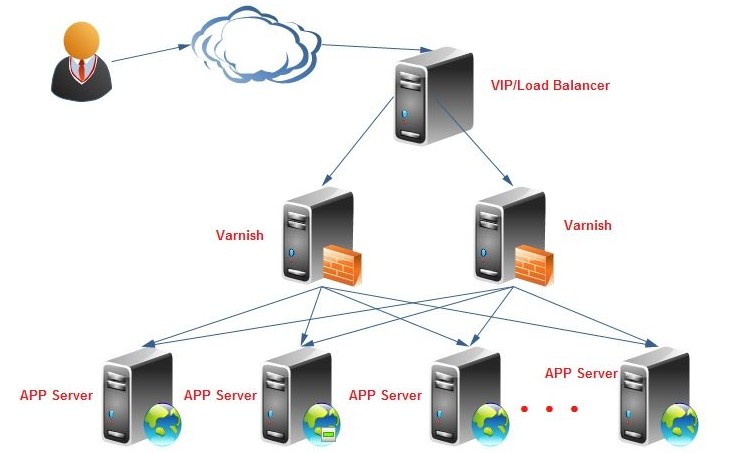
Varnish把数据存放在服务器的内存中,这种模式的效率是最高的,不过重启后数据会消失,官方透露3.0版本可以解决这个问题。Varnish可以设置0~60秒的精确缓存时间,不过32位的机器支持的缓存文件最大为2 GB。Varnish采用VCL的配置,而且具有强大的管理功能,如top、stat、admin、lis,所以管理方式比较灵活。Varnish的状态机设计不仅巧妙,结构也很清晰,利用二叉堆管理缓存文件,即可达到随时删除的目的。
与传统的Squid 相比,Varnish具有性能更高、速度更快、管理更加方便等诸多优点:
Varnish采用了“Visual Page Cache”技术,所有缓存的数据都直接从内存读取,而Squid从硬盘读取缓存的数据,它避免了Squid频繁在内存、磁盘中交换文件,性能要比Squid高。
Varnish稳定性比Squid高,宕机率很低。
通过Varnish管理端口,可以使用正则表达式快速、批量地清除部分缓存,这一点是Squid不能具备的。
如果您是 RedHat/centos 系统想安装 varnish,您需要安装以下软件包:
automake
autoconf
libtool
ncurses-devel
libxslt
groff
pcre-devel
pkgconfig
Varnish可以支持更多的并发连接。因为Varnish的TCP连接与释放比Squid快,所以在高并发连接情况下可以支持更多的TCP连接。
以下是在配置好 yum 包管理器的情况下运行
yum install -y automake autoconf libtool ncurses-devel libxslt groff pcre-devel pkgconfig
[root@node18 ~]# yum install -y automake autoconf libtool ncurses-devel libxslt groff pcre-devel pkgconfig
Loaded plugins: fastestmirror
Loading mirror speeds from cached hostfile
* base: mirrors.grandcloud.cn
* extras: mirrors.grandcloud.cn
* updates: mirrors.grandcloud.cn
Setting up Install Process
Package automake-1.9.6-2.3.el5.noarch already installed and latest version
Package autoconf-2.59-12.noarch already installed and latest version
Package libtool-1.5.22-7.el5_4.i386 already installed and latest version
Package ncurses-devel-5.5-24.20060715.i386 already installed and latest version
Package libxslt-1.1.17-4.el5_8.3.i386 already installed and latest version
Package groff-1.18.1.1-13.el5.i386 already installed and latest version
Package pcre-devel-6.6-6.el5_6.1.i386 already installed and latest version
Package 1:pkgconfig-0.21-2.el5.i386 already installed and latest version
Nothing to do
[root@node18 ~]#
下载varnish源代码并编译安装
mkdir varnish_setup
cd varnish_setup/
wget http://repo.varnish-cache.org/source/varnish-2.1.5.tar.gz
tar zxf varnish-2.1.5.tar.gz
cd varnish-2.1.5
./autogen.sh
./configure --prefix=/usr
make
cd bin/varnishtest && ./varnishtest tests/*.vtc # <== 这一步执行测试,很费时,可省略
cd ../.. # <=== 如果执行了测试,否则执行安装
make install
注意:本文的安装与默认安装不同
varnishd将被安装到 /usr/sbin/varnishd
配置文件 /usr/etc/varnish/default.vcl
下面是安装的详细记录:
[root@node18 ~]# mkdir varnish_setup
[root@node18 ~]# cd varnish_setup/
[root@node18 varnish_setup]# wget http://repo.varnish-cache.org/source/varnish-2.1.5.tar.gz
--2012-11-20 10:23:32-- http://repo.varnish-cache.org/source/varnish-2.1.5.tar.gz
正在解析主机 repo.varnish-cache.org... 194.31.39.155
Connecting to repo.varnish-cache.org|194.31.39.155|:80... 已连接。
已发出 HTTP 请求,正在等待回应... 200 OK
长度:1530856 (1.5M) [application/x-gzip]
Saving to: `varnish-2.1.5.tar.gz'
100%[======================================>] 1,530,856 51.2K/s in 20s
2012-11-20 10:23:53 (73.2 KB/s) - `varnish-2.1.5.tar.gz' saved [1530856/1530856]
[root@node18 varnish_setup]#
[root@node18 varnish_setup]# tar zxf varnish-2.1.5.tar.gz
[root@node18 varnish_setup]# cd varnish-2.1.5
[root@node18 varnish-2.1.5]# ls
aclocal.m4 config.guess depcomp install-sh Makefile.in varnishapi.pc.in
autogen.sh config.h.in doc lib man
bin config.sub etc LICENSE missing
ChangeLog configure include ltmain.sh README
compile configure.ac INSTALL Makefile.am redhat
[root@node18 varnish-2.1.5]#
[root@node18 varnish-2.1.5]# ./autogen.sh
+ aclocal
+ libtoolize --copy --force
+ autoheader
+ automake --add-missing --copy --foreign
+ autoconf
[root@node18 varnish-2.1.5]# ./configure --prefix=/usr
checking build system type... i686-redhat-linux-gnu
checking host system type... i686-redhat-linux-gnu
checking target system type... i686-redhat-linux-gnu
checking for a BSD-compatible install... /usr/bin/install -c
checking whether build environment is sane... yes
checking for gawk... gawk
checking whether make sets $(MAKE)... yes
checking for gcc... gcc
checking for C compiler default output file name... a.out
checking whether the C compiler works... yes
...
configure: creating ./config.status
config.status: creating Makefile
config.status: creating bin/Makefile
config.status: creating bin/varnishadm/Makefile
config.status: creating bin/varnishd/Makefile
config.status: creating bin/varnishlog/Makefile
config.status: creating bin/varnishhist/Makefile
config.status: creating bin/varnishncsa/Makefile
config.status: creating bin/varnishreplay/Makefile
config.status: creating bin/varnishstat/Makefile
config.status: creating bin/varnishsizes/Makefile
config.status: creating bin/varnishtest/Makefile
config.status: creating bin/varnishtop/Makefile
config.status: creating doc/Makefile
config.status: creating doc/sphinx/Makefile
config.status: creating etc/Makefile
config.status: creating include/Makefile
config.status: creating lib/Makefile
config.status: creating lib/libvarnish/Makefile
config.status: creating lib/libvarnishapi/Makefile
config.status: creating lib/libvarnishcompat/Makefile
config.status: creating lib/libvcl/Makefile
config.status: creating lib/libjemalloc/Makefile
config.status: creating man/Makefile
config.status: creating redhat/Makefile
config.status: creating varnishapi.pc
config.status: creating config.h
config.status: executing depfiles commands
[root@node18 varnish-2.1.5]# make
make all-recursive
make[1]: Entering directory `/root/varnish_setup/varnish-2.1.5'
Making all in include
make[2]: Entering directory `/root/varnish_setup/varnish-2.1.5/include'
make[2]: Nothing to be done for `all'.
make[2]: Leaving directory `/root/varnish_setup/varnish-2.1.5/include'
Making all in lib
make[2]: Entering directory `/root/varnish_setup/varnish-2.1.5/lib'
Making all in libvarnishcompat
make[3]: Entering directory `/root/varnish_setup/varnish-2.1.5/lib/libvarnishcompat'
if /bin/sh ../../libtool --tag=CC --mode=compile gcc -DHAVE_CONFIG_H -I. -I. -I../.. -I../../include -g -O2 -MT daemon.lo -MD -MP -MF &.deps/daemon.Tpo& -c -o daemon.lo daemon.c;
then mv -f &.deps/daemon.Tpo& &.deps/daemon.Plo&; else rm -f &.deps/daemon.Tpo&; exit 1; fi
mkdir .libs
gcc -DHAVE_CONFIG_H -I. -I. -I../.. -I../../include -g -O2 -MT daemon.lo -MD -MP -MF .deps/daemon.Tpo -c daemon.c -fPIC -DPIC -o .libs/daemon.o
...
mkdir .libs
gcc -g -O2 -o .libs/varnishsizes varnishsizes.o ../../lib/libvarnish/.libs/libvarnish.so -lrt -lnsl ../../lib/libvarnishcompat/.libs/libvarnishcompat.so ../../lib/libvarnishapi/.libs/libvarnishapi.so -lpcre -lm -lcurses -lpthread
creating varnishsizes
make[3]: Leaving directory `/root/varnish_setup/varnish-2.1.5/bin/varnishsizes'
make[3]: Entering directory `/root/varnish_setup/varnish-2.1.5/bin'
make[3]: Nothing to be done for `all-am'.
make[3]: Leaving directory `/root/varnish_setup/varnish-2.1.5/bin'
make[2]: Leaving directory `/root/varnish_setup/varnish-2.1.5/bin'
Making all in man
make[2]: Entering directory `/root/varnish_setup/varnish-2.1.5/man'
make[2]: Nothing to be done for `all'.
make[2]: Leaving directory `/root/varnish_setup/varnish-2.1.5/man'
Making all in etc
make[2]: Entering directory `/root/varnish_setup/varnish-2.1.5/etc'
make[2]: Nothing to be done for `all'.
make[2]: Leaving directory `/root/varnish_setup/varnish-2.1.5/etc'
Making all in doc
make[2]: Entering directory `/root/varnish_setup/varnish-2.1.5/doc'
Making all in sphinx
make[3]: Entering directory `/root/varnish_setup/varnish-2.1.5/doc/sphinx'
make[3]: Nothing to be done for `all'.
make[3]: Leaving directory `/root/varnish_setup/varnish-2.1.5/doc/sphinx'
make[3]: Entering directory `/root/varnish_setup/varnish-2.1.5/doc'
make[3]: Nothing to be done for `all-am'.
make[3]: Leaving directory `/root/varnish_setup/varnish-2.1.5/doc'
make[2]: Leaving directory `/root/varnish_setup/varnish-2.1.5/doc'
Making all in redhat
make[2]: Entering directory `/root/varnish_setup/varnish-2.1.5/redhat'
make[2]: Nothing to be done for `all'.
make[2]: Leaving directory `/root/varnish_setup/varnish-2.1.5/redhat'
make[2]: Entering directory `/root/varnish_setup/varnish-2.1.5'
make[2]: Nothing to be done for `all-am'.
make[2]: Leaving directory `/root/varnish_setup/varnish-2.1.5'
make[1]: Leaving directory `/root/varnish_setup/varnish-2.1.5'
[root@node18 varnish-2.1.5]#
[root@node18 varnish-2.1.5]# cd bin/varnishtest && ./varnishtest tests/*.vtc
# top TEST tests/a00000.vtc passed (0.001s)
# top TEST tests/a00001.vtc passed (0.001s)
# top TEST tests/a00002.vtc passed (0.001s)
# top TEST tests/a00003.vtc passed (0.001s)
# top TEST tests/a00004.vtc passed (0.001s)
# top TEST tests/a00005.vtc passed (0.001s)
# top TEST tests/a00006.vtc passed (0.001s)
# top TEST tests/a00007.vtc passed (0.001s)
# top TEST tests/a00008.vtc passed (1.806s)
# top TEST tests/a00009.vtc passed (0.256s)
# top TEST tests/a00010.vtc passed (0.002s)
# top TEST tests/b00000.vtc passed (0.757s)
# top TEST tests/b00001.vtc passed (0.675s)
# top TEST tests/b00002.vtc passed (0.683s)
...
# top TEST tests/v00023.vtc passed (0.575s)
# top TEST tests/v00024.vtc passed (0.587s)
# top TEST tests/v00025.vtc passed (0.673s)
# top TEST tests/v00026.vtc passed (0.590s)
# top TEST tests/v00028.vtc passed (0.581s)
# top TEST tests/v00029.vtc passed (1.310s)
# top TEST tests/v00030.vtc passed (0.585s)
# top Slowest test: tests/p00005.vtc 8.022s
# top Total tests run: 196
# top Total duration: 204.346s
[root@node18 varnishtest]#
[root@node18 varnishtest]# cd ../..
[root@node18 varnish-2.1.5]# make install
Making install in include
make[1]: Entering directory `/root/varnish_setup/varnish-2.1.5/include'
make[2]: Entering directory `/root/varnish_setup/varnish-2.1.5/include'
make[2]: Nothing to be done for `install-exec-am'.
test -z &/usr/include/varnish& || mkdir -p -- &/usr/include/varnish&
/usr/bin/install -c -m 644 'shmlog.h' '/usr/include/varnish/shmlog.h'
/usr/bin/install -c -m 644 'shmlog_tags.h' '/usr/include/varnish/shmlog_tags.h'
/usr/bin/install -c -m 644 'stat_field.h' '/usr/include/varnish/stat_field.h'
/usr/bin/install -c -m 644 'stats.h' '/usr/include/varnish/stats.h'
/usr/bin/install -c -m 644 'varnishapi.h' '/usr/include/varnish/varnishapi.h'
make[2]: Leaving directory `/root/varnish_setup/varnish-2.1.5/include'
make[1]: Leaving directory `/root/varnish_setup/varnish-2.1.5/include'
Making install in lib
...
Making install in redhat
make[1]: Entering directory `/root/varnish_setup/varnish-2.1.5/redhat'
make[2]: Entering directory `/root/varnish_setup/varnish-2.1.5/redhat'
make[2]: Nothing to be done for `install-exec-am'.
make[2]: Nothing to be done for `install-data-am'.
make[2]: Leaving directory `/root/varnish_setup/varnish-2.1.5/redhat'
make[1]: Leaving directory `/root/varnish_setup/varnish-2.1.5/redhat'
make[1]: Entering directory `/root/varnish_setup/varnish-2.1.5'
make[2]: Entering directory `/root/varnish_setup/varnish-2.1.5'
make[2]: Nothing to be done for `install-exec-am'.
/root/varnish_setup/varnish-2.1.5/install-sh -d -m 0755 /usr/var/varnish
test -z &/usr/lib/pkgconfig& || mkdir -p -- &/usr/lib/pkgconfig&
/usr/bin/install -c -m 644 'varnishapi.pc' '/usr/lib/pkgconfig/varnishapi.pc'
make[2]: Leaving directory `/root/varnish_setup/varnish-2.1.5'
make[1]: Leaving directory `/root/varnish_setup/varnish-2.1.5'
[root@node18 varnish-2.1.5]#
[root@node18 varnish-2.1.5]# whereis varnish
varnish: /usr/etc/varnish /usr/include/varnish
[root@node18 varnish-2.1.5]# whereis varnishd
varnishd: /usr/sbin/varnishd /usr/man/man1/varnishd.1
[root@node18 varnish-2.1.5]# ls /usr/etc/varnish/default.vcl
/usr/etc/varnish/default.vcl
[root@node18 varnish-2.1.5]#
ccproxy免注册码服务器区6.27 MBv8.0 破解版
详情proxycap汉化版服务器区2.93 MBv5.00 永久使用版
详情serv-u 简体中文破解版服务器区19.00 MBv15.1.6.25 绿色特别版
详情Tiny PXE Server服务器区5.54 MBv1.0.0.23 绿色版
详情xp sp3 i386安装包服务器区13.20 MB
详情msysgit中文版服务器区37.60 MBv2.6.3 官方最新版
详情北京时间服务器区234.50 MBv11.4.0
详情ASP - IIS服务器服务器区628.00 KB绿色版
详情Apache Tomcat9.0 64位服务器区10.43 MBv9.0.0.9 官方免安装版
详情阿拉丁UDP洪水攻击器服务器区977.00 KBv2.1 绿色版
详情NAS4Free 64位(NAS服务器搭建软件)服务器区224.25 MBv10.2.0
详情Serv U FTP Server 10(FTP 服务器)服务器区6.30 MBv10.3多国语言绿色特别版
详情遥志代理服务器服务器区2.86 MBv8.0.0.0 官方版_ccproxy中文版
详情u-mail邮件服务器软件免费版服务器区53.89 MBv9.8.66 最新版
详情易邮邮件服务器eyoumailserver免费版服务器区1.03 MBv5.3 最新版
详情网克工具GhostCast Server服务器区265.00 KBv8.3 绿色中文版
详情守望简单web服务器服务器区627.00 KB绿色免费版
详情xampps X64服务器区163.00 MBv8.1.2 最新版
详情iis6.0完整安装包服务器区7.66 MB适用于XP2003Internet信息服务
详情win10 iis管理器服务器区15.10 MBv7.0 完整安装包
详情点击查看更多
Microsoft Exchange Server 2003服务器区128.85 MB简体中文企业版
详情Microsoft Exchange Server 2010 SP2服务器区526.00 MB64位微软官方安装版
详情PHP 5.3.1 VC6 Thread Safe Zip服务器区13.14 MB
详情IIS7.0完整安装包服务器区174.00 MB安装版
详情SQL Server 2005服务器区36.00 MB精简绿色版(36M)
详情XAMPP for Windows服务器区147.00 MBv8.0.5.0 多国语言官方安装版
详情umail邮件系统服务器区59.29 MBv9.8.58 官方版
详情ccproxy免注册码服务器区6.27 MBv8.0 破解版
详情Cisco GNS3模拟实验常用的思科IOS集合包服务器区221.00 MBv2017 最新版
详情PHP v5.2.9.2 For Windows服务器区17.51 MB官方安装版
详情apache Tomcat for windows服务器区7.18 MBv5.5.20 中文版
详情PHP For Windows服务器区18.64 MBv5.6 官方版
详情Kiwi Syslog Server日志服务器服务器区59.84 MBv9.5.1 安装版
详情IIS5.1完整安装包服务器区11.82 MB
详情tomcat6.0绿色版服务器区7.68 MBv6.0.45 x64版
详情xampp(PHP5.3+5.6+7.0)服务器区31.50 MBv2016 官方绿色版
详情phpStudy 2018服务器区59.81 MBv1.17 最新版
详情bitvise ssh server(最好用的winsshd)服务器区19.00 MBv8.3.7 官网最新版
详情Microsoft SQLServer 2005 Management Studio Express SP3服务器区41.90 MB32位/64位 官方简体中文版
详情phpstudy 2016(PHP环境一键安装包)服务器区52.00 MB支持php7
详情点击查看更多
PHPOpt for IIS系统服务器区5.70 MBv4.0 简体中文版
详情xmanager enterprise 5注册机服务器区10.00 KB附注册码及使用教程
详情zend framework 1.10.2 核心版服务器区5.72 MB官方版
详情Apache Tomcat 7.0服务器区8.54 MBv7.0.70 官方安装版
详情迷你ASP服务器(Sws AspWebServer)服务器区1.33 MBv2.3 官方版
详情360主机卫士iis版服务器区20.60 MBv1.0.9.47 官方版
详情XAMPP for Windows服务器区147.00 MBv8.0.5.0 多国语言官方安装版
详情服务器安全狗服务器区26.01 MBv5.0.24188 官方版
详情花生壳动态域名解析服务器区2.35 MBv5.3.0.34889 官方正式版
详情IIS7.0完整安装包服务器区174.00 MB安装版
详情Apache Tomcat8.0 64位服务器区10.38 MBv8.5.4 官方免安装版
详情xampps X64服务器区163.00 MBv8.1.2 最新版
详情iis6.0完整安装包服务器区7.66 MB适用于XP2003Internet信息服务
详情apache Tomcat for windows服务器区7.18 MBv5.5.20 中文版
详情IIS5.1完整安装包服务器区11.82 MB
详情IIS 6.0(windows2003 安装iis i386 所需要文件)完整安装包服务器区15.30 MB2012-4-21号修复
详情啊D组件查询程序服务器区213.00 KBv1.0 绿色版
详情Microsoft Exchange Server 2003服务器区128.85 MB简体中文企业版
详情Nginx服务器套装(wnmp开发环境套件)服务器区38.51 MBv2.2.4 官方版
详情小旋风asp webserver软件服务器区1.00 MB官方安装版
详情点击查看更多